VOID Video Object Deletion: Research and Limits [2026]
Yash Thakker
Author
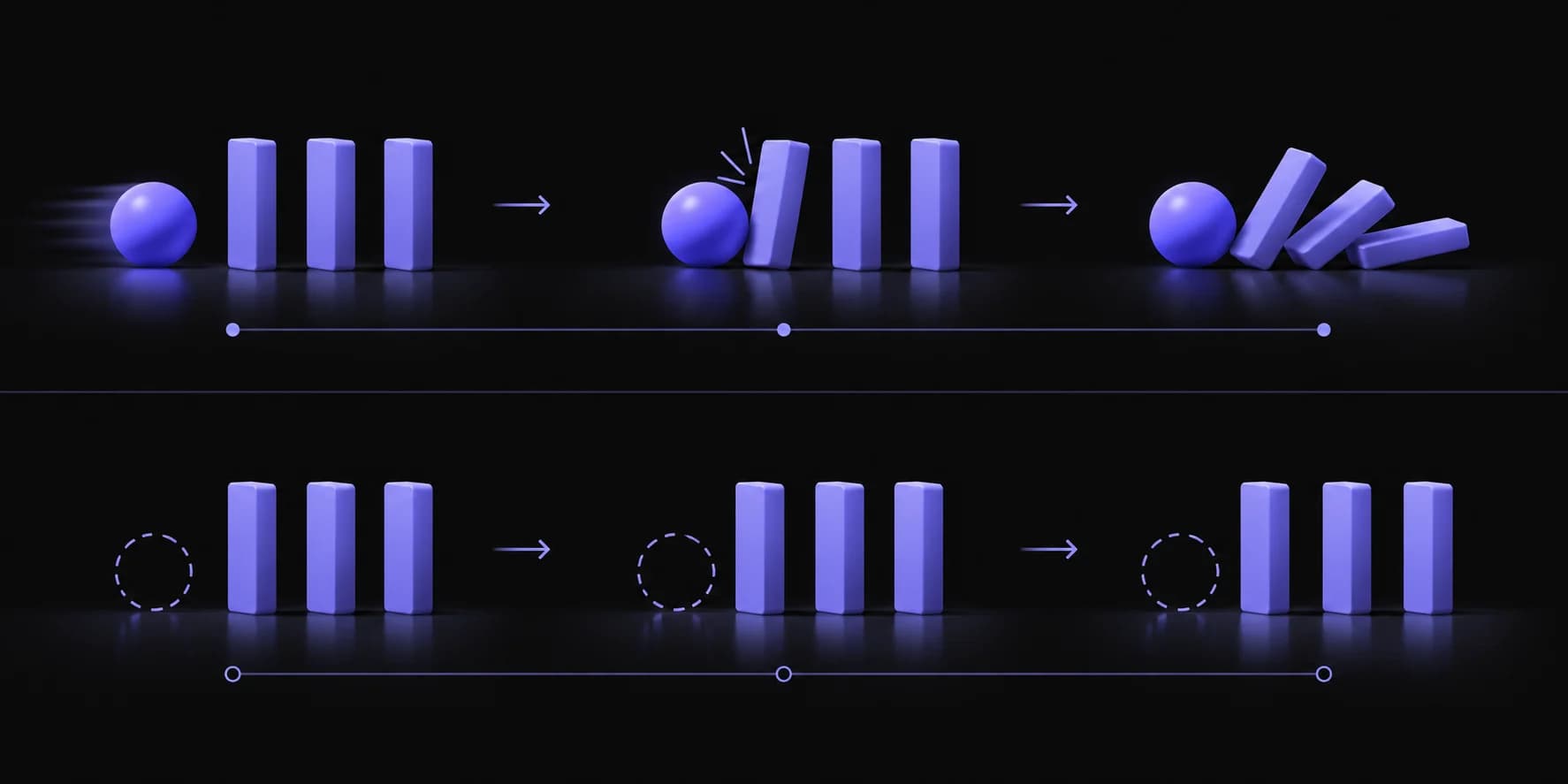
Removing an object from video can create a surprisingly obvious problem even when the empty space looks convincing. Imagine deleting the ball that knocks over a row of blocks while leaving the blocks falling exactly as before. The picture may be clean, but the action no longer makes sense. That is the distinction behind VOID, short for Video Object and Interaction Deletion.
The research asks what an edited sequence should look like when an object's effects disappear along with the object. It is a more demanding problem than cutting out a presenter or placing a product over a different background. It also involves generation: the result proposes an alternative sequence rather than recovering an unseen historical record.
This article explains the published work and offers a practical way to evaluate the kinds of edits it explores. The illustration above is an explanatory concept, not a benchmark output. We also separate the research from BGRemover.video's current background-removal workflow so an interesting paper does not become an unsupported product promise.
What problem is VOID trying to solve?
VOID studies object removal in which the deleted object has physical effects on the rest of the scene. The aim is to produce a plausible edited sequence where those interactions change as well, rather than leaving an unexplained collision or movement behind.
The authors describe a framework using counterfactual training examples, a vision-language component to identify affected regions, and video diffusion to generate an alternative outcome. The VOID paper reports experiments on synthetic and real data. That is a research claim within an evaluation setting, not a universal guarantee for arbitrary footage.
The problem becomes easier to understand when you separate appearance from action. Appearance is the texture, color, and geometry visible after an object is removed. Action is what the remaining scene does through time. A method can produce reasonable-looking pixels while failing to explain why a nearby object moves.
For an editor, this distinction changes the review. You cannot inspect only the hole where the deleted object used to be. You also need to follow the objects it touched, supported, blocked, or otherwise affected. Sometimes the important defect appears later in the clip and far from the original mask.
The useful question is therefore broader than whether the object disappeared. Ask whether the edited sequence communicates the intended alternative without breaking the surrounding scene. That makes VOID relevant to discussions of generative editing, while keeping it separate from routine foreground isolation.
How is interaction deletion different from background removal?
Background removal generally preserves a foreground subject while replacing or discarding the surrounding scene. Interaction deletion can change what the surviving scene does after an object is removed, which is a different and more generative operation.
For a presenter clip, you may want the speaker's face, gestures, and timing to remain exactly as recorded while an office wall becomes a branded background. The key questions are subject selection, edge quality, and compositing. Inventing a different hand movement would usually be a defect, not an improvement.
For an interaction-removal task, preserving all motion can be the problem. If a removed object caused another object to move, the desired edit may require a new trajectory or a different final state. The acceptable amount of change is therefore much larger, and the review needs to account for that.
| Editing task | What should usually remain | What the edit changes |
|---|---|---|
| Foreground cutout | Subject appearance and recorded motion | Visibility of the surrounding scene |
| Background replacement | Foreground action and timing | The scene behind the subject |
| Object inpainting | Unaffected visible content | Pixels where an object was removed |
| Interaction deletion | Intended unaffected content | The object and relevant downstream effects |
Our SAM video segmentation guide covers the selection side of this distinction. A mask can identify what to keep or remove, but it does not by itself determine how the remaining scene ought to evolve. Choosing the right task is the first step toward choosing the right tool.
Does a plausible result show what really happened?
No: a plausible counterfactual video is a generated alternative, not evidence of an event the camera recorded without the removed object. This matters whenever the original footage is being used to explain a real occurrence.
Consider a demonstration where one object supports another. Removing the support and showing a fall creates a possible alternative sequence. Keeping the supported object floating would be visually implausible, but generating a realistic fall still does not make that fall an observed fact. The model is creating a result under an editing instruction.
For fictional work, advertising concepts, or visual experimentation, that creative freedom may be precisely the point. For instructional or documentary material, the edit can change the meaning of the scene. Decide which category the project belongs to before evaluating whether the output looks convincing.
Preserve the original recording and label working versions clearly. If collaborators review only the generated result, they may assume that unchanged-looking regions are faithful to the source. Keep a side-by-side comparison available so the extent of the alteration can be understood.
Also separate technical success from editorial suitability. A result can be smooth and believable yet unsuitable because it changes an action the audience needs to understand accurately. Conversely, an obviously stylized visualization may be appropriate when it clearly illustrates a hypothetical scenario. The acceptance criteria should include what the viewer is meant to believe, not only whether the pixels look polished.
What do the published demonstrations establish?
Published demonstrations show how the authors' method behaves on selected examples; they do not establish that every clip, object, or interaction will work equally well. Use them to understand the task and form test questions, not to infer a guaranteed production outcome.
The VOID project page includes comparisons with other methods and examples of a second refinement pass intended to address shape instability. Those examples are useful because they expose both the intended behavior and a kind of failure the authors consider important.
When watching a comparison, first identify the instruction. What object was removed? Which region was allowed to change? What counts as the desired outcome? Without those details, one method may appear more faithful simply because it changes less, while another may be solving a broader task.
Then examine the entire sequence. A convincing opening can conceal a later deformation, sudden object appearance, or inconsistent endpoint. Watch once for overall motion and again for identity and shape. If controls allow, compare the same moment across the source and output rather than relying on memory.
Avoid turning a demonstration into an invented score. Unless you have a defined test set and measurement method, statements such as perfect accuracy or a universal percentage improvement are not justified. A more useful note is specific: the target vanished, the affected object followed a plausible path, and an unrelated object changed shape near the end.
How should an editor evaluate an interaction-removal experiment?
Evaluate the experiment against a written description of what should change and what must remain intact. That prevents a visually impressive result from being accepted merely because it hides the original object successfully.
Start with a short, simple clip whose action you can explain. Identify the target object, the objects it interacts with, and the parts of the scene that should be unaffected. Keep the desired outcome narrow enough that a reviewer can judge it without inventing a new story after seeing the output.
Review three kinds of consistency
First, review object identity. A surviving object should not turn into a different shape or acquire new parts unless that change is part of the intended edit. Second, review motion. Positions and trajectories should connect plausibly from one moment to the next. Third, review the scene. Lighting, shadows, and background structure should not shift unexpectedly.
Use both normal-speed playback and frame inspection. Normal playback reveals distracting jumps; paused frames help locate their cause. A defect that lasts only a few frames can still be visible when it occurs at a high-contrast boundary or in the viewer's focus of attention.
Keep failed results as evaluation evidence rather than discarding them immediately. They help identify which source conditions are difficult and whether a revised instruction actually improved the result. If you compare methods, use the same source and describe any difference in inputs, masks, or manual correction. Fair comparisons need more than similarly attractive thumbnails.
Which shots are better handled with ordinary compositing?
Ordinary compositing is often the better fit when you want to preserve the recorded subject and simply change the surrounding presentation. It offers a clearer relationship between the source and the output than asking a generative system to alter the scene's behavior.
A talking-head lesson is a good example. The speaker's gestures, expression, and lip synchronization are the content. Replacing the wall behind them should not require inventing different movement. A foreground cutout placed over a new background directly expresses that goal.
A product rotation can be similar. If the aim is a consistent catalog style, preserving the product's dimensions and markings matters more than creating an elaborate alternative world. An automatic cutout may still need careful review, but its intended scope is narrower.
Some shots do not need removal at all. A tighter crop, a different take, or a physical background change may be more effective than generating or masking difficult content. Before adopting a complex method, ask what the audience needs to see and whether a simpler edit delivers it.
BGRemover.video's video background removal feature belongs in this practical evaluation. Test the available workflow against the intended task rather than assuming it includes interaction deletion because this article discusses that research. The broader background-removal workflow guide can help plan the capture, review, and export stages.
What would a research integration need before it was ready for production?
A production integration would need reliable input handling, clear controls, predictable failure behavior, suitable exports, and evidence from representative footage. A published model or demo is a starting point for that work, not the whole product.
Users need to understand the scope of an edit before they approve it. A tool should make it clear which object is targeted and which surrounding regions may change. Without that feedback, the user may discover only after export that an apparently local instruction altered other content.
The workflow also needs a practical review loop. It should be possible to compare the source and result, reject an output, preserve the original, and retry with a clearer instruction. For a long project, these decisions need to be traceable across shots so collaborators can tell which version was accepted.
Technical compatibility matters too. The result must preserve the intended duration, frame shape, audio relationship, and file format. A visually good research output may still require additional processing before it can be used in a timeline or delivered to a client.
The official VOID repository is the appropriate starting point for developers investigating the released implementation. Review its current setup, assets, and instructions directly. This article does not provide a tested deployment recipe or a promised BGRemover.video release date; those would require separate implementation and validation evidence.
How should teams discuss research without overstating it?
Describe the demonstrated capability, its evaluation context, and the gap between the research and your own product or workflow. That gives readers a useful explanation while preserving the distinction between an interesting direction and an available feature.
A clear research summary can say that a method addresses a particular kind of interaction and that the authors report results on selected data. A clear product description can say which controls and outputs a user can access today. Joining those statements with an unsupported claim that the product already performs the research task misleads the reader.
Use separate examples when explaining potential applications. For instance, a hypothetical editor might want to remove a prop and revise a related action. Label that as a scenario to investigate rather than a feature announcement. Do not attach a launch date or performance guarantee unless there is an actual release commitment and supporting evidence.
For buyers and creators, ask practical questions: Can I try this on my material? What does the export contain? What content might change outside the selection? How do I keep the original? Those questions turn a research headline into a meaningful evaluation.
This approach also makes updates easier. When a capability becomes available and is tested, the article can link to the concrete workflow and evidence. Until then, explaining the idea accurately is more valuable than suggesting that every research advance has already reached a production service.
What is the useful takeaway for your next edit?
Choose the editing method according to the change you intend to make. If you need to preserve a person or product and replace the background, evaluate foreground isolation and compositing. If removing an object should change the surrounding action, recognize that you are asking for a generated alternative sequence.
VOID is useful research because it makes that second problem explicit. It encourages a broader review of the scene, including consequences that remain after an object disappears. The same habit improves everyday editing: inspect the whole result rather than only the area you directly changed.
Keep the source, define what must remain accurate, and judge the actual exported file. Treat selected demonstrations as evidence about those examples, and treat any future product integration as a separate claim requiring its own validation. Clear boundaries make the research easier to understand and the finished work easier to trust.
For an ordinary background change, start with BGRemover.video and one representative clip. For interaction deletion, use the authors' published materials to understand the experiment and evaluate whether its broader changes fit the purpose of your video.
Frequently asked questions
What does VOID stand for?
VOID stands for Video Object and Interaction Deletion. The research studies removal that also changes the physical interactions caused by the deleted object, rather than only filling its former image region.
Is VOID the same as removing a video background?
No. Background removal usually keeps a foreground subject and changes what is behind it. VOID addresses a different task: deleting an object while generating a plausible sequence in which its effects are also absent.
Does VOID recover what really happened behind an object?
No. A generated counterfactual is a plausible alternative, not a recovered recording of an event that the camera never captured. Keep that distinction clear whenever the footage is presented as factual.
Does BGRemover.video include VOID?
This article does not establish a VOID integration in BGRemover.video. Use the product's available background-removal controls for current work and treat the research as a separate subject.
How should I evaluate an object-removal result?
Check both the removed region and the rest of the sequence. Look for changed identities, warped objects, inconsistent shadows, implausible motion, and alterations outside the intended edit.