SAM 2 Video Background Removal: Practical Guide 2026
Yash Thakker
Author
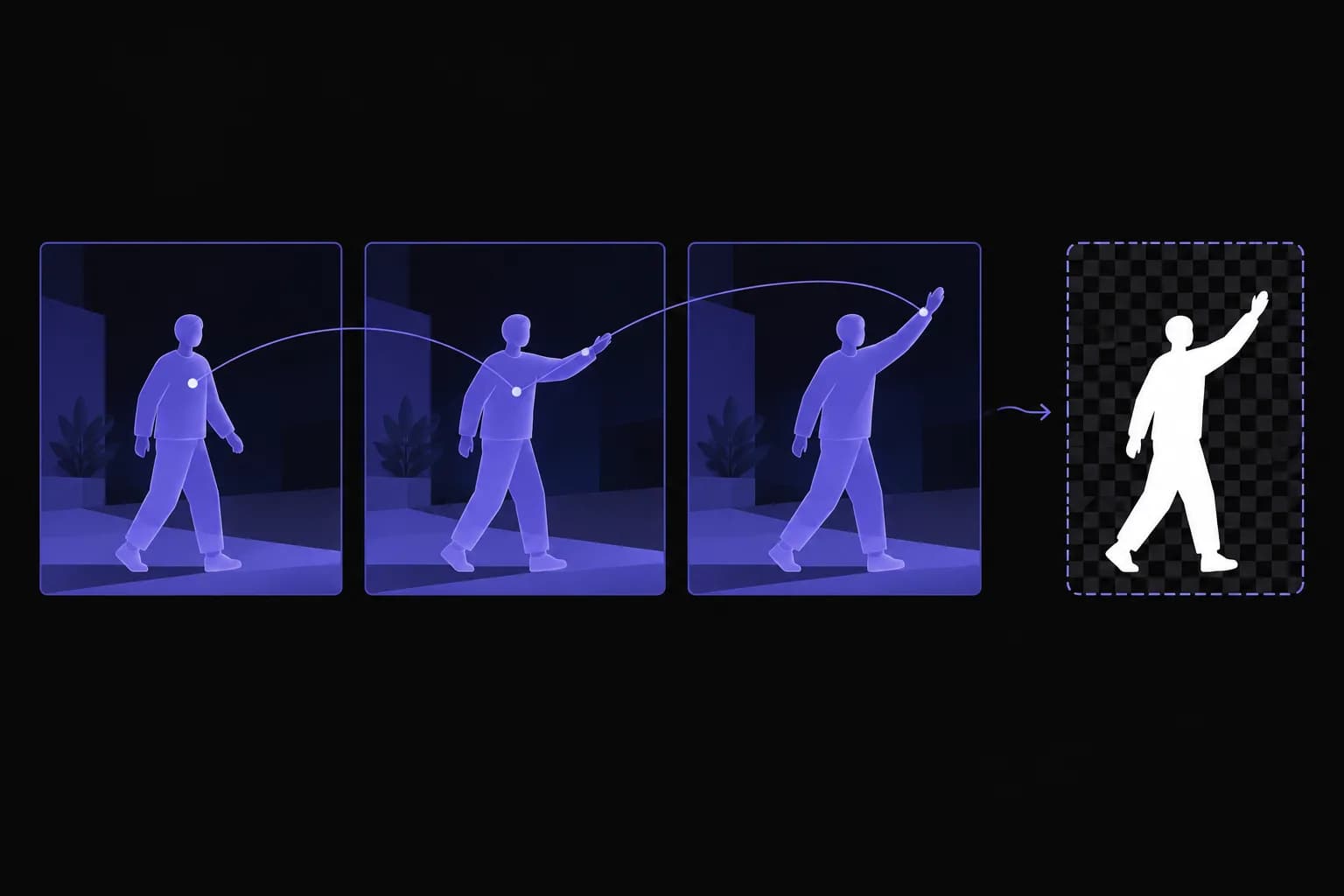
SAM 2 can help remove a video background by identifying a selected subject and following its region across frames. It does not, by itself, deliver every part of a finished background-removal workflow. You still need to decide what belongs in the foreground, review the masks, deal with difficult boundaries, and export a video that the next application can use.
That distinction matters when a short model demo becomes a real editing task. A mask overlay can look impressive while hair still needs refinement, a hand disappears after crossing the body, or the exported clip loses audio. Those failures sit at different stages, so treating them all as one measure of model quality makes troubleshooting harder.
This guide explains how to plan a SAM 2 workflow and judge the result without relying on invented benchmark tables or fixed hardware promises. It is useful for developers evaluating a custom pipeline and editors deciding whether they need that level of control. For either audience, the best first experiment is a small representative clip with a clear definition of success.
What does SAM 2 actually do for video background removal?
SAM 2 performs promptable segmentation: it predicts which pixels belong to an object identified through interaction and can propagate that selection across a video. The resulting masks are ingredients for background removal, object isolation, annotation, and other applications.
Meta's SAM 2 announcement describes the model as a unified approach for images and videos. Its video capability makes it more suitable for following a subject through time than a workflow that independently selects a new foreground in every frame. That does not mean every occlusion or scene change is solved automatically.
For a presenter, the intended foreground might include the person and a product they hold. For a furniture demonstration, it might include the chair while excluding the salesperson. Both requests involve segmentation, but they require different choices about subject identity and boundaries. The model cannot infer your publishing brief simply because an object occupies the center of the picture.
A useful output at this stage is a set of masks linked to the correct source frames and object identifiers. A finished video needs more: the foreground colors, the selected replacement scene or alpha representation, the original timing, and any audio that should remain. Keep those responsibilities separate when designing or comparing tools.
Our AI background remover guide explains the broader editing task. SAM 2 is an option within that task, particularly when you want direct control over the subject selection and can build or maintain the surrounding software.
How is a segmentation mask different from a polished cutout?
A segmentation mask describes the selected region, while a polished cutout also needs convincing boundary colors and opacity. Hair, translucent material, and motion blur often contain a mixture of foreground and background within the same pixel.
Imagine a hand moving quickly across a patterned wall. The camera may record a soft boundary where hand and wall contribute to the same pixel. A hard selection that keeps or removes that pixel can either leave a fringe of the wall or cut away part of the hand. Feathering the entire outline may hide a harsh edge, but it can also make solid parts of the subject look translucent.
Alpha matting addresses a related but different problem: estimating the contribution of the foreground at mixed boundaries. It can be part of a larger pipeline, yet its presence should not be assumed merely because a tool outputs a mask. Evaluate the actual composite against the background you intend to use.
Review more than the colored mask overlay
A bright mask overlay can conceal contamination from the old scene because it covers the original edge color. View the extracted subject over light, dark, and intended replacement backgrounds. Check narrow gaps between fingers, loose hair, thin furniture legs, and any object with transparent sections.
Then watch the same boundaries in motion. A small spatial error that changes from frame to frame can be more distracting than a stable, slightly soft outline. Our hair-edge troubleshooting guide gives further examples of the distinction between keeping detail and producing a clean-looking composite.
Define what is acceptable for the particular output. A small presenter overlay in a training video and a full-screen beauty close-up do not require the same level of edge detail, but both need deliberate review.
What should you prepare before installing or running SAM 2?
Prepare a reproducible environment, a short representative source, and a record of the model version and settings you plan to evaluate. Installation is only useful when you can later explain which combination produced a result.
Use the official SAM 2 repository for current installation instructions, checkpoints, and example notebooks. Its requirements and APIs can change, and the repository distinguishes newer SAM 2.1 checkpoints from earlier releases. Follow the matching configuration and checkpoint examples instead of combining a model file from one tutorial with configuration names from another.
Keep the experiment in a separate environment so dependency changes do not disturb another editing or machine-learning project. Record the repository revision, framework versions, checkpoint, device, and the input file used. If you change one of those later, label the new run separately rather than overwriting the earlier result without explanation.
Prepare the source with timing in mind. If the selected example works with extracted frames, retain the original frame order and the information needed to reconstruct playback. Do not silently assume every camera clip has the same frame rate. Keep audio separate when necessary and record how it will be restored during export.
Start with a clip long enough to contain a meaningful challenge but short enough to inspect completely. A person briefly passing behind another object is more informative than a motionless subject against an empty wall. Include the failure case that matters to your intended use, and keep an untouched copy so multiple methods can be evaluated against the same source.
How do prompts and corrections fit into the workflow?
Prompts identify the intended object, and corrective prompts help when the predicted region no longer matches that intention. Treat interaction as part of the workflow instead of promising that one click will always solve a whole clip.
Begin on a frame where the subject is clearly visible. Choose points or a box that distinguish it from nearby objects, following the interface and coordinate conventions of the official example you are using. Verify the initial result before propagating it; a mistaken first selection can produce a long sequence of consistently wrong masks.
Object identifiers matter when more than one subject is present. Decide whether a held object should be tracked separately or included in the desired composite. Keep that choice consistent as the scene develops. If two people cross, review the result after the crossing rather than assuming the selected identity remains correct.
A practical review loop is straightforward: create the initial selection, propagate over a manageable segment, inspect difficult moments, add a correction where needed, and inspect the updated output. Save enough information to reproduce the interaction. Otherwise, an apparently successful experiment may depend on a series of clicks that nobody recorded.
Avoid describing a largest-region heuristic as reliable automatic subject detection. The largest region may be a wall, floor, or table rather than the person or product you want. If you add an automatic selection system, evaluate that system separately from SAM 2's ability to follow a correctly identified object. A failure to choose the subject and a failure to track it require different fixes.
What are the stages of a complete background-removal pipeline?
A complete pipeline connects source decoding, subject selection, mask propagation, quality review, compositing, and encoding while preserving timing and the required media tracks. Each stage needs a clear input and output so problems can be traced.
- Inspect the source file, including dimensions, duration, orientation, and audio.
- Decode or prepare frames in the form expected by the selected implementation.
- Initialize the predictor and identify the intended foreground objects.
- Propagate masks and store them with unambiguous frame and object references.
- Review difficult moments and apply targeted corrections where needed.
- Refine boundaries when the delivery use case requires more than the raw masks provide.
- Composite onto the chosen background or preserve transparency in a suitable master.
- Encode the delivery file, restore required audio, and check the complete export.
Keep intermediate outputs useful
Save representative masks and composited frames during development. If the final video has a jagged edge, those intermediates show whether the issue began in segmentation, refinement, scaling, or encoding. Without them, every export defect tends to get blamed on the model.
Do not blur masks across time indiscriminately. Mixing the previous silhouette into the current frame without accounting for movement can leave ghost edges or lag behind a fast hand. Any smoothing method needs review on motion, especially around the exact actions that caused instability.
For a solid-background delivery, the final composition can use an ordinary video format supported by the destination. For an editable transparent master, check both the format and the receiving editor. Our white-background video workflow covers the simpler case where the background is intentionally baked into the finished clip.
How should you measure speed and quality honestly?
Measure the full workflow on representative inputs and report the conditions alongside the result. Model inference time alone does not tell an editor how long it takes to receive an approved, usable video.
Keep separate timings for initialization, source preparation, mask inference, human correction, compositing, and encoding. Include upload and download time when evaluating a hosted tool, but identify those as network-dependent steps. A warm model running a second clip and a fresh process loading its checkpoint are different conditions.
For quality, use a small written checklist rather than a vague percentage called accuracy. Check whether the correct object remains selected, whether required parts disappear, whether old background remains visible, and whether the outline changes distractingly over time. If you have carefully annotated reference masks, document the metric and annotation process before presenting numerical scores.
| Evaluation question | Evidence to keep |
|---|---|
| Did the intended object stay selected? | Source and result around crossings or occlusions |
| Are edges usable in the final composition? | Light, dark, and intended-background previews |
| How much human intervention was needed? | Prompt history and correction time |
| Did export preserve the deliverable? | Full playback check with dimensions, timing, and audio |
| Is the run reproducible? | Model, revision, device, settings, and source identifiers |
Do not reuse published model benchmarks as estimates for your own computer or editing queue. They answer a narrower research question under specified conditions. Likewise, avoid calling a set of hypothetical examples a case study. A useful comparison can describe tradeoffs without inventing time savings, success rates, or customer results.
When is a browser tool more practical than a custom pipeline?
A browser tool is more practical when you need a finished editing workflow and do not need to control the segmentation implementation. A custom SAM 2 pipeline makes more sense when object selection, integration, or research control justifies maintaining the surrounding system.
For a developer building an annotation or compositing product, access to masks and prompts can be central. You may need repeatable processing, integration with your storage, or a review interface for difficult clips. Those requirements can justify engineering work, provided the project includes failure handling and quality checks rather than only a successful notebook demonstration.
For a creator making a handful of presenter overlays, the important questions are usually simpler: can the footage be uploaded, does the subject look right, and can the result be opened in the next editor? BGRemover.video provides a video background-removal workflow with replacement-background choices and export options. Its current video interface distinguishes a transparent Pro Bundle from MP4 with a custom background and displays credit requirements for the selected job.
This article does not establish which model BGRemover.video uses internally. It also does not establish that its edges are better than a particular SAM 2 configuration. Compare the actual output on your footage instead of relying on an assumed architecture, an invented memory-window size, or unsupported claims about processing speed.
If a single shot needs precise intervention, a hybrid workflow can be sensible: use an accessible tool for straightforward clips and reserve a more controllable process for the difficult material. Keep the delivery requirements consistent across both routes.
Start with a representative experiment
SAM 2 is useful when you need promptable video segmentation and are prepared to handle the work around it. Its masks can support background removal, but the final result depends on subject selection, edge treatment, timing, compositing, and encoding as well as inference. Keeping those stages visible makes both development and editing decisions more reliable.
Choose one short clip that contains the movement and detail your real project depends on. Record the environment, inspect the initial selection, review the propagated masks, and export a complete result with the correct audio and dimensions. Measure intervention time alongside compute time. That experiment will tell you more about suitability than an unsourced table of universal frame rates or accuracy scores.
If your priority is preparing footage without maintaining a model environment, try the same representative clip in BGRemover.video. Check the available outputs and evaluate the downloaded composition in its destination. Choose the workflow that meets your actual delivery needs, with evidence you can repeat when the next batch of footage arrives.
Frequently asked questions
Can SAM 2 remove a video background?
SAM 2 can generate masks for selected objects across video frames. A complete background-removal workflow must also apply those masks, refine difficult edges where needed, preserve timing, and encode the result.
Is SAM 2 the same as an alpha-matting model?
No. Object segmentation identifies a region, while alpha matting estimates partial opacity at mixed boundaries such as hair and motion blur. A mask may need additional work before it becomes a convincing composite.
Does SAM 2 automatically know which object I want?
The promptable video workflow uses your selection to identify the target. An automatic mask generator can propose regions, but choosing the intended subject still requires a separate decision or selection system.
How fast is SAM 2 on my computer?
Measure it on your own hardware, model checkpoint, input, and settings. Repository benchmarks describe particular conditions and do not include every step in a finished video-delivery workflow.
Does BGRemover.video use SAM 2 internally?
This guide does not establish the internal model used by BGRemover.video. Compare its available editing and export workflow with your needs instead of assuming a specific model architecture or benchmark result.