How to Remove AI Watermarks and C2PA Metadata (2026 Guide)
Yash Thakker
Author
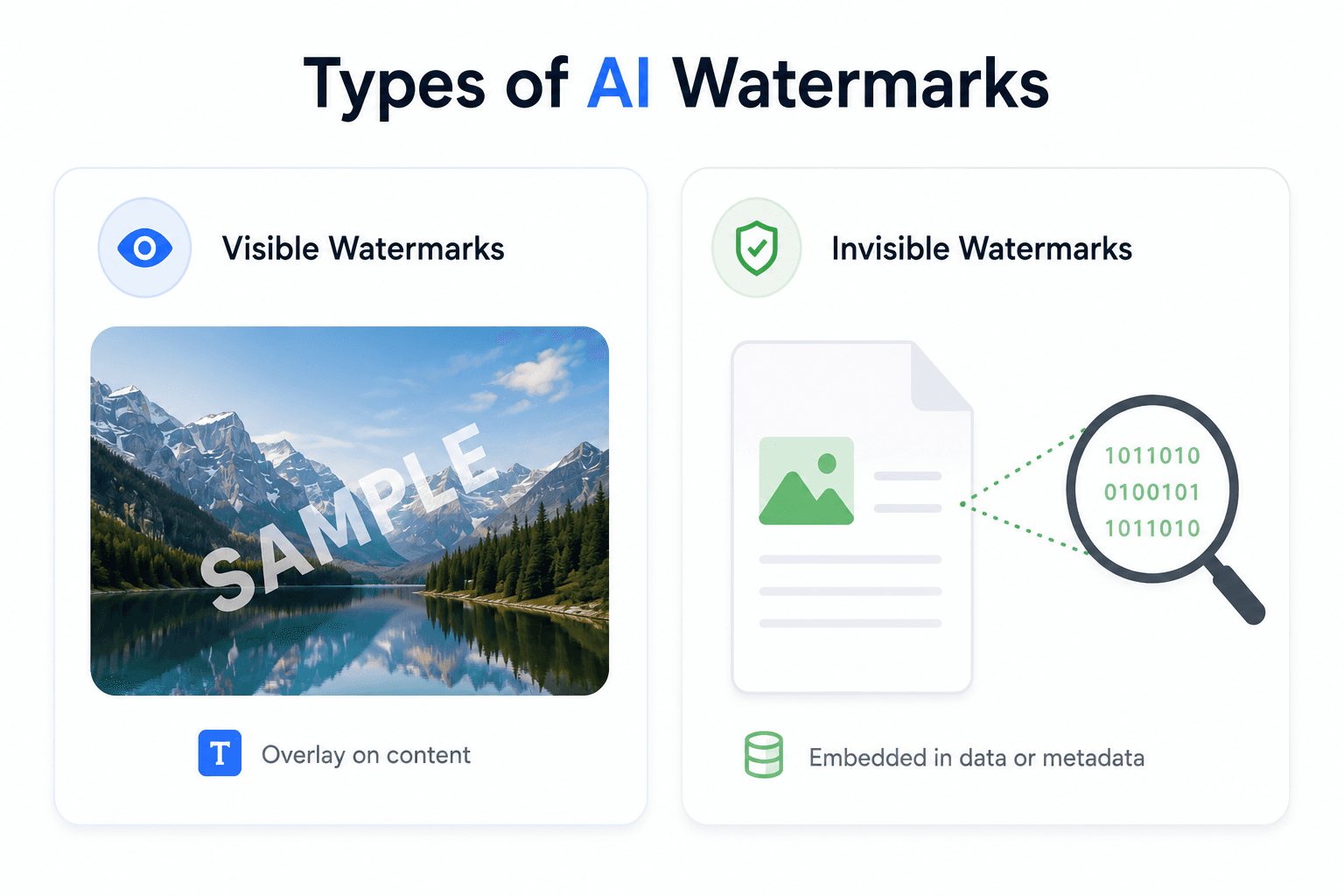
If you've generated an image with ChatGPT, Gemini, or Claude and noticed it carries hidden data you didn't put there, you're not imagining it. Most AI image generators now attach a C2PA content credentials manifest — a signed metadata block naming the generator, signing algorithm, and timestamp — and it travels with the file until something strips it out. BGRemover.video's free watermark removers do exactly that, entirely in your browser: ChatGPT Watermark Remover, Gemini Watermark Remover, and Claude Watermark Remover.
Before you use any of them, it's worth understanding exactly what gets removed and what doesn't — because "AI watermark" actually covers two very different technologies, and only one of them can be stripped without altering the image itself.
TL;DR: What Actually Gets Removed
| Question | Answer |
|---|---|
| Can C2PA metadata be removed? | Yes — it's a metadata container, not part of the image data |
| Can SynthID be removed? | No — it's embedded in the pixels/tokens themselves; no tool can strip it without altering the content |
| Does removal change the image? | No — pixel data is untouched; only hidden metadata chunks are deleted |
| Do I need to upload my file? | No — processing runs locally in your browser via the File/Blob APIs |
| Is it legal? | Yes, for content you own; commercial EU distribution has separate Article 50 labeling rules |
| Which tool do I need? | ChatGPT, Gemini, or Claude watermark remover, matching whichever tool generated the image |
What Is C2PA Metadata, and Why Does It Matter?
C2PA stands for the Coalition for Content Provenance and Authenticity, and its "content credentials" are effectively a nutrition label for a digital file: a signed manifest recording who or what created the content, which software touched it, and when. The specification has grown fast — as of January 2026 the C2PA coalition counts over 6,000 member and affiliate organizations, and the current specification family sits at version 2.4, according to the official C2PA technical specification.
Adoption now spans three layers of the content pipeline: capture devices (Nikon's Z9 and Z8, Sony Alpha bodies, and newer Canon cameras ship with native C2PA support), creation tools (Adobe has integrated automatic content-credentials writing across Creative Cloud, including its Firefly AI generator), and the platforms that display or verify the credentials on the other end.
Because it's stored as metadata rather than baked into the pixels, C2PA is inherently fragile — a plain screenshot of an AI-generated image destroys the manifest entirely, since the screenshot is a brand-new file with no container metadata from the source. That fragility cuts both ways: it's exactly what makes a dedicated C2PA remover possible, and exactly why regulators don't treat it as a sufficient standalone safeguard.
Is SynthID the Same Thing as an AI Watermark You Can Remove?
No — and this is the single most important distinction to understand before you try to "remove a watermark" from an AI image. SynthID, Google's invisible watermarking system, embeds an imperceptible signal directly into an image's pixel values (or, increasingly, into a text output's token-selection pattern) rather than attaching it as a removable file property.
That embedding is what makes it durable. According to reporting comparing the two systems, SynthID survives operations like cropping, resizing, screenshots, and JPEG compression precisely because the signal is distributed across the entire image rather than concentrated in one metadata block. C2PA, by contrast, is easily stripped because it's fragile metadata that a screenshot or format conversion can destroy on its own — no special tool required.
The practical upshot: no software, including BGRemover.video's tools, can detect or remove SynthID without altering the underlying pixels of the image, which would defeat the point of using the image at all. What our tools remove is the separate, genuinely removable layer — the C2PA manifest plus standard EXIF/XMP metadata — while leaving the picture itself pixel-for-pixel identical.
How Do I Remove C2PA Metadata From a ChatGPT, Gemini, or Claude Image?
Step 1: Pick the Tool That Matches Where the Image Came From
Use the ChatGPT Watermark Remover for DALL-E and GPT Image outputs, the Gemini Watermark Remover for Google's Gemini images, or the Claude Watermark Remover for anything exported from Claude. All three run the same underlying scan-and-strip process; the naming just matches the search terms people actually use.
Step 2: Upload Your File
Drop in your PNG, JPEG, or SVG — the ChatGPT and Claude tools also accept PDF, DOCX, ODT, HTML, and Markdown files, since C2PA and hidden metadata aren't limited to images. Nothing is uploaded to a server: processing runs locally in your browser through the File and Blob APIs.
Step 3: Let the Scan Run
The tool inspects the file for a C2PA manifest and any EXIF/XMP metadata chunks — it does not scan for SynthID, since that signal isn't a file property it can detect or touch.
Step 4: Review the Removal Report
Before anything is downloaded, you see exactly which fields were found: the generating software, signer identity, signing algorithm, and issued date, if present. This transparency step matters — you should know what was actually attached to your file before you decide to strip it.
Step 5: Export the Cleaned File
Download the result. It's byte-for-byte identical to the source image except for the removed metadata chunks — same picture, same resolution, same pixels, just without the hidden manifest riding along.
Is It Actually Legal to Remove This Metadata?
Removing content credentials from a file you created or own is legal in effectively every jurisdiction — metadata attached to your own content is yours to manage, the same way you can strip EXIF data (camera model, GPS location) from a personal photo before posting it. Where it gets more complicated is commercial distribution inside the EU: Article 50 of the EU AI Act, which phases in transparency obligations through 2025–2026, requires providers of generative AI systems to mark AI-generated content in a machine-readable way, and C2PA's AI assertion type is one accepted way of satisfying that requirement, according to coverage of the EU AI Act's content credentials requirements.
That means stripping the manifest from AI-generated content you're distributing commercially inside the EU can intersect with a separate labeling obligation — worth checking if that applies to your use case — distinct from the straightforward legality of removing metadata from a personal file. Removing credentials from content you don't own, specifically to misrepresent synthetic content as authentic, raises separate terms-of-service and potential fraud concerns that have nothing to do with the technical removal step itself.
Why Would Someone Want to Remove C2PA Metadata?
Privacy is the most common reason: a C2PA manifest can embed the software, account, or device that generated an image, information you may not want traveling with a file you share publicly.
Platform compatibility matters too — some platforms handle embedded metadata inconsistently, occasionally displaying unwanted labels, altering how a file previews, or interfering with re-uploads.
File hygiene for creators and designers who assemble final assets from multiple AI and non-AI sources: stripping stray metadata before final export avoids shipping internal tool names or draft timestamps to a client.
Consolidating a workflow: if you're already using BGRemover.video's AI background remover or image background remover to prep an AI-generated image for publishing, stripping its metadata in the same browser session, without a separate upload to a different tool, keeps the whole pipeline local.
What This Tool Does Not Do
Being upfront about the limits matters more than the feature list. This tool cannot remove SynthID or any other pixel-embedded invisible watermark — that signal isn't metadata, and no software can strip it without visibly or invisibly altering the image content itself, which isn't something a "cleaning" tool should ever silently do. It also doesn't fabricate a false authenticity claim; it simply removes what was there. If your use case requires certifying that content is human-made, removing an AI generator's credentials doesn't change what actually created the file, only what the file's metadata claims about it.
Comparison: C2PA Metadata vs. Pixel-Embedded Watermarks
| Property | C2PA Content Credentials | SynthID (Pixel Watermark) |
|---|---|---|
| Where it lives | File metadata / manifest | Embedded in pixel or token data |
| Survives a screenshot? | No — destroyed automatically | Yes — distributed across the image |
| Removable? | Yes, without touching pixels | No, not without altering content |
| What it records | Generator, signer, edit history, timestamp | A detectable "this came from a SynthID model" signal only |
| Tool that handles it | ChatGPT / Gemini / Claude watermark remover | No removal tool exists |
Frequently Asked Questions
Can you actually remove an AI watermark from an image? It depends which kind of watermark you mean. A C2PA content credentials manifest — the metadata block naming the generator, signer, and edit history — is stored as removable metadata and can be stripped without touching a single pixel. An invisible pixel-level watermark like Google's SynthID is different: it's embedded in the image data itself, not attached as metadata, so no tool can remove it without altering the picture.
What is C2PA metadata exactly? C2PA (Coalition for Content Provenance and Authenticity) content credentials are a signed metadata manifest attached to a file that records who or what generated it, when, and with what software — a bit like a nutrition label for digital media. Camera makers, Adobe, and AI generators including ChatGPT/DALL-E and Gemini increasingly attach one automatically, and it has over 6,000 member organizations behind the standard as of January 2026.
Is SynthID the same thing as C2PA? No, and confusing the two is the most common mistake. SynthID embeds an imperceptible signal directly into an image's pixel values (or a text's token-selection pattern), so it survives screenshots, resizing, and format conversion. C2PA is a separate, removable metadata container that a plain screenshot destroys on its own. They're designed to work together, not as substitutes for each other.
Is it legal to remove C2PA metadata? Removing content credentials from a file you created or own is legal in effectively every jurisdiction — you control the metadata attached to your own content. It gets more complicated if you're distributing AI-generated content commercially inside the EU, where Article 50 of the EU AI Act requires machine-readable labeling of AI-generated content, so stripping the label before commercial distribution there can raise separate compliance questions distinct from the removal itself.
Does removing C2PA metadata change the image? No. A proper C2PA/metadata remover only deletes the hidden manifest, EXIF, and XMP data chunks stored alongside the image — the pixel data is untouched, so you get back a visually identical file. That's a different outcome from asking a tool to remove SynthID, which no tool can do without altering the actual pixels.
Which AI tools attach C2PA metadata to their images? Adobe has integrated automatic content credentials writing across Creative Cloud, including Firefly. ChatGPT/DALL-E and GPT Image outputs can carry a C2PA manifest, and Gemini images may carry one alongside Google's separate SynthID pixel watermark. Camera makers including Nikon, Sony, and newer Canon bodies have also shipped native C2PA support in hardware.
Do I need to upload my file to remove the metadata? Not with BGRemover.video's watermark removers — processing runs entirely in your browser using the File and Blob APIs, so the image is never transmitted to a server. You get a removal report showing exactly which fields were found and stripped before you download the cleaned file.
Try It Now
Pick the remover that matches where your image came from — all three run the same local, upload-free process:
- ChatGPT Watermark Remover — for DALL-E and GPT Image outputs
- Gemini Watermark Remover — for Google Gemini images
- Claude Watermark Remover — for anything exported from Claude
Related reading:
- AI Background Remover — clean up the rest of an AI-generated image after stripping its metadata
- More guides on the BGRemover Blog