Bulk Furniture Background Removal: Catalog Guide 2026
Yash Thakker
Author
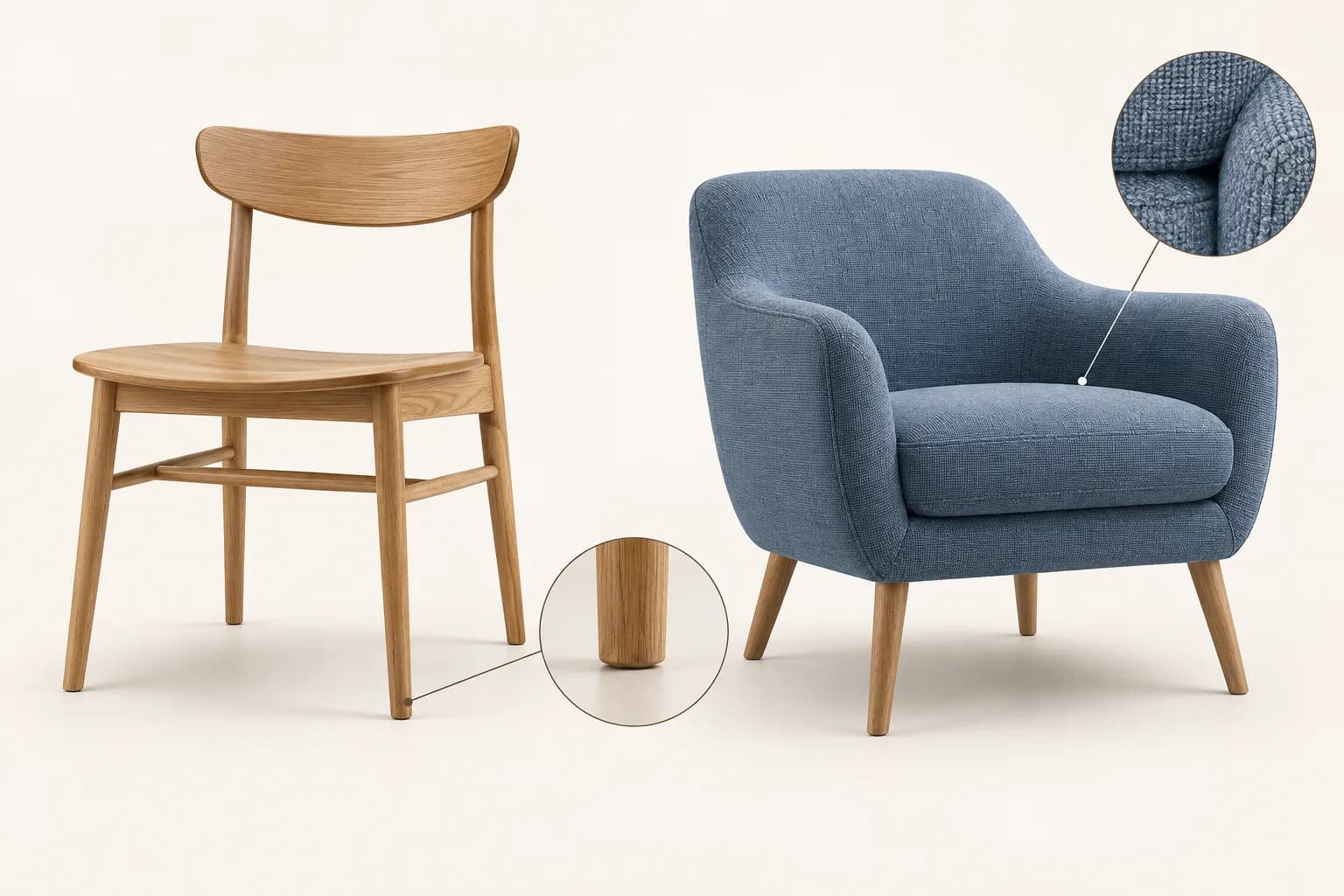
Bulk background removal for furniture photography is a catalog workflow: organize the source images, apply a consistent visual standard, separate each product from its scene, and review the results before publication. The automation is only one part. A useful catalog must also keep the correct product variant, preserve thin structural details, and show furniture at a consistent visual scale.
A chair with the wrong finish is not improved by a perfect white background. A sofa with a missing leg is not ready because most of its outline looks clean. These errors become harder to spot when many files are processed and renamed at once. The solution is to design the review process before increasing the volume of work.
This guide uses “bulk” to describe a collection of images and the way you manage it. It does not assume that every background-removal tool supports simultaneous uploads, automated catalog integration, or a specific batch limit. Confirm those capabilities in the current product interface. The production principles still apply whether you process one image at a time or use a supported batch workflow.
What should a furniture catalog look consistent about?
Set a consistent standard for framing, background, product orientation, and file purpose while preserving the real differences between products. Consistency should make comparison easier, not make different furniture appear identical.
Define the main catalog view first. For example, a chair collection may use a comparable three-quarter angle so viewers can see the seat, back, and legs. Decide how much surrounding space the image needs and where the furniture should sit within the frame. Avoid selecting the crop independently for every item without looking at the collection as a whole.
Next, distinguish image roles. A main product image identifies the item. A detail image shows a joint, fabric, mechanism, or finish. A lifestyle image explains scale and use in a room. Background removal may suit the main view while being unnecessary or counterproductive for the lifestyle view.
Document the standard with a small approved example set. Include at least one simple object and one difficult object so the standard does not describe only ideal conditions. Record the intended background treatment, shadow approach, crop, and output requirements in plain language. A teammate should be able to apply it without guessing what “make it premium” means.
How do you organize source files and product variants?
Organize each source around the exact product and variant before processing it. Keep the original file, the working asset, and the approved delivery version linked through a stable naming system or asset record.
Start with the product identifier you already use in the catalog. Add the variant, angle, and image role. A filename that distinguishes the oak finish from the walnut finish is more useful than “chair-final-new.” If several people work on the catalog, agree on the naming scheme before files begin moving between folders.
Create a simple status record. Each row can identify the source file, the expected product option, the processing status, and the review outcome. Mark missing or ambiguous source images as unresolved rather than assigning them to the closest-looking product. That is especially important when the same furniture design comes in similar fabrics or finishes.
Google Merchant Center’s image guidance emphasizes showing the exact variant, including its color, pattern, finish, and material. For a Google product listing, review that platform’s current requirements directly. More generally, an accurate mapping between image and product option is essential to a useful catalog.
Keep the original source in a separate location from processed outputs. If a later review finds that a rail was erased or the wrong crop was used, you should be able to return to the original without reconstructing it from a compressed storefront image.
Which sample images should you test before the full collection?
Test images that represent the different materials and structures in the collection, including the difficult cases. A successful solid cabinet does not establish that the same approach will preserve woven seating or glass tabletops.
Choose examples with thin legs, open backs, pale upholstery, dark metal, and reflective or transparent surfaces where those appear in your catalog. Include a product photographed against a similar-colored wall if that is common in the source set. The aim is to learn where the workflow succeeds and where additional attention is required.
Review the sample at both a close view and the actual catalog size. A large preview helps you find missing details; the catalog-size view shows whether the product is framed and grounded properly. Test more than one background when you intend to retain a reusable transparent asset.
Record the failure type, not just pass or fail
A useful review note says “gap between rear legs retained old wall” or “woven edge lost fine strands.” Those notes point toward an action. A generic “bad image” label does not tell the next person whether to retry extraction, adjust the composition, or request a better source.
If the source is fundamentally unsuitable, stop repeating the same operation. A new photograph against a clearer setting may be more dependable than extensive repair. For shiny small objects and similar surface problems, the jewellery background-removal guide explains why reflections require separate attention from the outside outline.
How do you preserve legs, rails, weave, and fabric edges?
Inspect the structure of the furniture against the original, especially where background should remain visible through the object. The empty spaces are as important as the solid outline.
For a chair, check the openings between legs, rails, and back supports. A mask may keep a patch of wall inside a narrow gap or erase a thin rail that resembles the background. Both failures can change the apparent construction. Review these areas systematically rather than relying on the overall silhouette.
For woven or perforated materials, determine what the delivered image needs to show at its intended size. Small openings can merge visually when reduced, but they should not become arbitrary solid patches. If fine structure is important to the product’s appearance, inspect the source quality and the extraction result before promising a clean cutout.
Soft upholstery and fringes need a different judgment from hard wood or metal. A slightly soft boundary can be natural, while an aggressively sharpened mask can make fabric look cut from paper. Check whether the edge follows the actual material and whether it contains unwanted color from the old scene.
The image background remover can provide the initial separation. Use the output as a reviewable asset, not as proof that every furniture detail has been understood correctly. A catalog standard should make room for exceptions that need manual work or a new photograph.
Should you remove the floor shadow or keep it?
Keep a shadow when it fits the intended composition and helps the furniture sit convincingly on the surface. Remove or revise it when it carries the wrong floor color, conflicts with the new scene, or obscures the product.
The shadow directly beneath a chair leg communicates contact. A long cast shadow communicates the direction and character of the light. Treat those as different visual elements. Removing both can make the object float; retaining both without review can carry part of the original room into a supposedly clean catalog image.
Look at the whole product rather than adding the same oval shadow under every item. A sofa, a pedestal table, and a four-legged chair contact the floor differently. A generic shadow that ignores those contact points can make the composition less believable.
If you need several output treatments, preserve a reusable cutout when the workflow supports it and keep the approved shadow treatment separate in your editing project. That makes it easier to prepare a white-background version and a contextual version without repeatedly extracting the object.
Shopify’s product-shadow tutorial illustrates shadow work as a deliberate part of product-image post-production. It is a useful reference for the visual task, not evidence that a particular shadow style will improve your sales. Review the result against the actual furniture and destination layout.
How do you keep the product color and material accurate?
Compare the processed result with the source and, when available, an approved product reference. Background removal should not become an excuse to change wood tone, fabric color, or finish until the catalog no longer represents the item.
Different surrounding colors can change how the same object appears to the eye. A warm room and a cool white background may make a neutral fabric feel different even without directly recoloring it. Evaluate the product in the final layout and use the approved reference to avoid compensating in the wrong direction.
Do not use aggressive smoothing to hide all texture. Fabric weave, wood grain, and surface finish can be relevant purchasing information. Equally, do not increase clarity until a soft material looks unnaturally coarse. The goal is a faithful image at the intended size, not maximum local contrast everywhere.
For glass or polished metal, remember that visible reflections remain inside the object after the outside background is removed. A new room behind a glass table may not match what the glass reflects or transmits. Consider a more controlled photograph or a simpler presentation when that mismatch cannot be resolved convincingly.
If you use a generated room as an illustration, keep it separate from evidence about exact scale or fit. Do not let a visually attractive composite imply that the furniture was photographed in a measured space when it was not.
What is a practical bulk production sequence?
Process the collection in manageable groups with a clear review point between extraction and publication. Grouping helps you spot repeated problems while preserving the ability to correct individual items.
- Inventory the source files and match each one to its product and variant.
- Separate main views, details, lifestyle images, and unsuitable sources.
- Approve a visual standard using representative samples.
- Check the current tool’s upload and output capabilities before processing.
- Remove backgrounds and retain a reusable master where appropriate.
- Inspect structural details, color, shadows, and crop for every approved output.
- Export the destination-specific versions and verify their filenames and dimensions.
- Preview the collection together before replacing the live images.
If the tool supports multi-file processing, confirm how it reports failures and names outputs. A batch that produces fewer files than expected needs reconciliation before publication. If the tool processes one asset at a time, the same inventory and review record can still make the collection manageable.
BGRemover.video offers an image-processing starting point, but do not infer a particular batch size or catalog integration from the word “bulk” in this guide. Test the current workflow with your sample set. Our guide to editing photos without Photoshop covers the broader choice of a lightweight image workflow.
Which export and storefront checks should you perform?
Check the actual downloaded files and the storefront layout, because an editor preview does not establish how the catalog will display them. Verify both technical compatibility and the visual relationship between products.
Choose an output format that fits the destination. A transparent master can be useful for future composition, while a finished catalog image may need a specific background and format. MDN’s image format guide explains the transparency differences between common formats. Confirm that the exported file retains the intended behavior.
Preview several products together in the collection grid. Check whether one chair appears much larger because it was cropped more tightly, whether a pale sofa loses its outline, or whether the apparent floor position jumps between images. Then open the product page and inspect the detail view, where defects hidden in the grid may become visible.
Verify that each variant selector displays the correct image. This is a separate check from looking at the image folder. A correct file can still be associated with the wrong product option during upload or import. Keep a record of which catalog entries were replaced so a problem can be traced and corrected.
Review each marketplace or feed’s current requirements for main images, overlays, generated content, and technical dimensions. Do not assume that a lifestyle composition accepted on your own website is also suitable as a platform’s primary product image.
How do you measure whether the workflow is helping?
Measure production reliability and customer clarity before assigning a business outcome to the background change. Useful operational measures include missing files, variant mismatches, correction work, and how often a published image needs replacement.
If you track time, record the actual stages: preparation, processing, review, correction, and publishing. Do not count only the automatic step and describe that as the full catalog cost. A small sample can reveal where the work is concentrated, but it should not be presented as a universal benchmark.
For customer outcomes, consider the questions people still ask about material, scale, or included parts. Better images may help answer those questions, while some uncertainty requires clearer written specifications or another view. The small-business video workflow can help you add a demonstration when a still image is insufficient.
Start your next catalog update with a representative set in BGRemover.video. Keep the original product identity, approve the difficult details, and test the files in the storefront before expanding the workflow. A dependable catalog comes from accurate assets and consistent review as much as from clean backgrounds.
Frequently asked questions
What does bulk background removal mean for a furniture catalog?
It means organizing and processing a collection of product images under a repeatable standard. It does not guarantee that a particular service offers a multi-file batch interface, nor does it remove the need to inspect individual products.
Should furniture photos retain shadows?
A suitable contact shadow can help furniture feel grounded, but the shadow should fit the intended background and actual product position. Keep a transparent master when available so delivery versions can use the required treatment.
Which furniture details need extra review?
Inspect gaps between legs and rails, woven materials, thin supports, glass, fringes, reflective metal, and soft upholstery edges. Compare the processed image with its source before approving it.
Can I recolor one furniture photo for every variant?
Do not assume a recolored image accurately represents another material or finish. Use verified images of the actual variants and preserve the mapping between each file and the product option being sold.
Will cleaner backgrounds automatically increase sales?
No. A clearer catalog can help people inspect products, but sales also depend on the offer, traffic, product information, and other factors. Evaluate your own outcomes without assigning an unsupported conversion percentage to background removal.