BGRemover: How to Remove Background from Gemini and Nano Banana AI-Generated Videos for Transparent Backgrounds, Background Replacement, and No-Install Browser Editing
Yash Thakker
Author
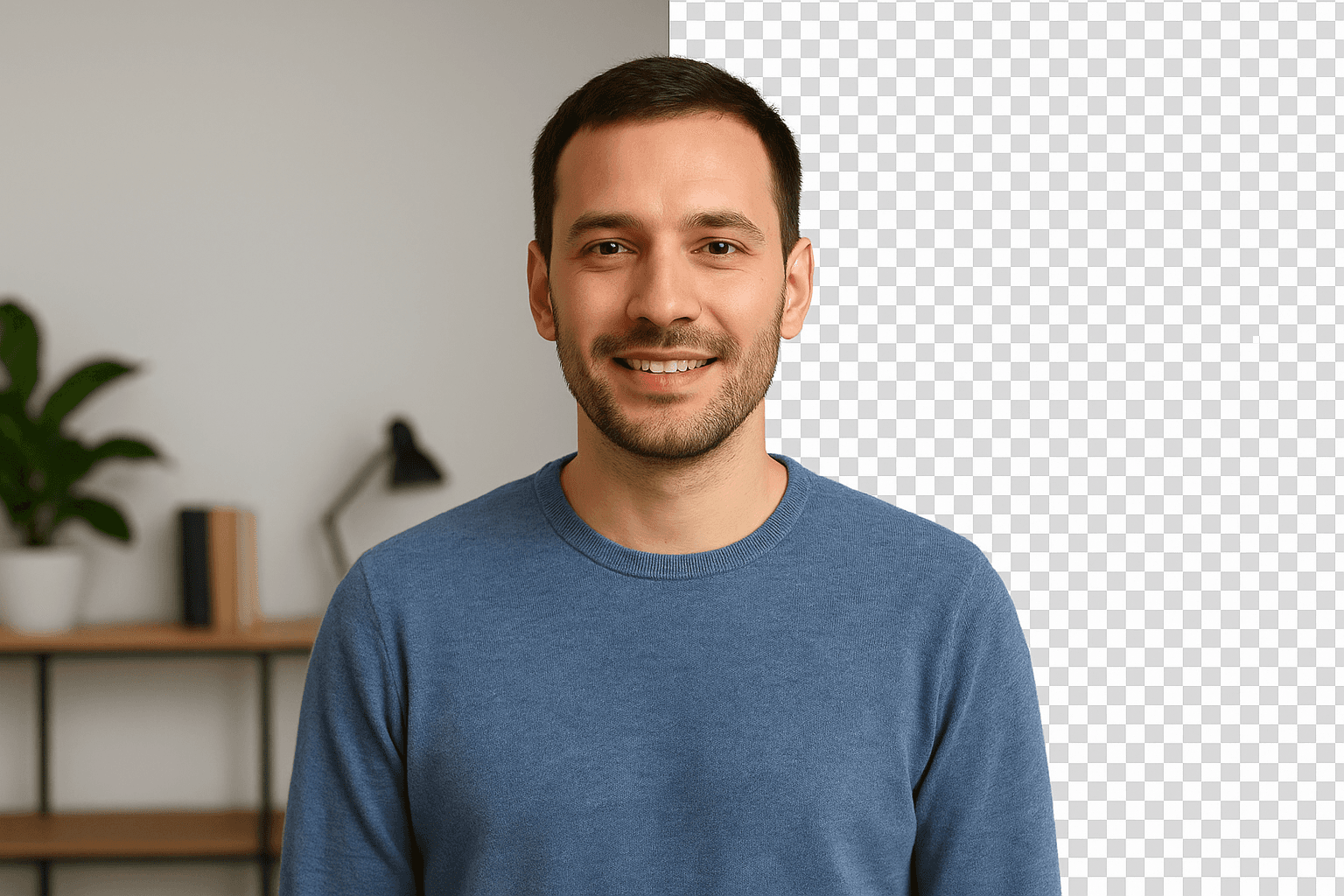
Transform your AI-generated videos with professional background removal
AI video generation tools like Google's Gemini and the viral Nano Banana are revolutionizing content creation, making it easier than ever to generate stunning videos in seconds. But there's one major limitation: these AI tools don't offer built-in background removal or transparency options.
If you've generated videos using AI and need to remove the background, replace it with custom imagery, or create transparent videos for professional projects, you've probably realized these platforms lack the advanced editing features found in tools like Adobe Premiere Pro.
That's where BGRemover.video comes in—your free, AI-powered solution to edit and polish AI-generated videos without expensive software or technical expertise.
The AI Video Generation Gap
AI-generated videos from platforms like Gemini and Nano Banana are impressive, but they come with a fixed background that limits your creative control. Whether you're creating content for:
- YouTube thumbnails and videos where you need custom branded backgrounds
- TikTok and Instagram Reels that require trendy or themed backdrops
- Marketing campaigns with specific brand colors and imagery
- E-commerce product demos showcasing items in different settings
- Educational content that needs clean, distraction-free presentations
You need the flexibility to [remove, replace, or make backgrounds transparent]( —features that most AI video generators simply don't provide. This limitation means your creative vision gets restricted by whatever background the AI tool generates, leaving you stuck with content that doesn't fully match your brand or project requirements.
Why BGRemover.video is Perfect for AI-Generated Content
*BGRemover.video is a free online video background remover specifically designed to bridge this gap. Here's how it solves the problem:
AI-Powered Background Removal
Our advanced AI automatically detects and removes backgrounds from your Gemini or Nano Banana videos—no green screen required. The technology intelligently handles complex elements like motion blur, moving subjects, shadows, and fine details such as hair strands and transparent objects while preserving your video's original quality and frame rate. This means you get professional results even with challenging footage that would require hours of manual editing in traditional software.
Support for All Major Formats
Upload your AI-generated videos in MP4, MOV, WEBM, or M4V formats—the most common video formats produced by AI tools—and export them as MP4, MOV, or WebM with transparent backgrounds. This flexibility ensures your edited videos are ready for any platform or project, whether you're uploading to social media, embedding in websites, or importing into other video editing software for further customization.
Make Backgrounds Transparent
Create professional videos with transparent backgrounds that seamlessly integrate into presentations, websites, or other video projects. This feature is particularly valuable for creating overlays, picture-in-picture effects, and layered compositions. Perfect for layering AI-generated content over custom backgrounds, allowing you to place your subjects in any environment imaginable—from corporate settings to fantasy worlds—giving you complete creative freedom.
Replace Backgrounds Easily
Don't just remove—replace! Use our ready-to-use templates featuring various professional and creative backgrounds, or upload your own custom images and video clips to create unique, branded content from your AI-generated videos. Whether you want a solid color backdrop for clean product presentations, a dynamic video background for engaging social content, or green screen backgrounds for further editing possibilities, you have complete control over the final look.
No Length Restrictions
Unlike many free tools that limit you to 30-second or 1-minute clips, BGRemover.video supports videos up to 120 minutes long and files up to 200MB—giving you the freedom to edit longer AI-generated content, full tutorials, webinars, or extended marketing videos without limitations. This means you can work on comprehensive projects without worrying about splitting your content or paying for premium plans just to process longer videos.
Batch Processing
Working with multiple AI-generated videos? Process them all at once with our batch processing feature, saving you hours of repetitive work. This is especially useful for content creators producing series content, marketers creating multiple ad variations, or businesses processing large volumes of product videos. Simply upload multiple videos simultaneously and let our AI handle the background removal for all of them efficiently.
How to Remove Background from AI Videos in 3 Steps
- Upload Your Video: Import your Gemini or Nano Banana generated video to BGRemover.video through our simple drag-and-drop interface
- AI Removes Background: Our AI automatically detects and removes the background in seconds with real-time preview, allowing you to see the results instantly
- Download or Customize: Export with a transparent background in your preferred format or replace it with your chosen imagery using our intuitive editor before downloading
BGRemover.video vs. Premium Editors
You don't need expensive software subscriptions or complex editing skills. While tools like Adobe Premiere Pro offer powerful features and extensive editing capabilities, they come with:
- High costs ($22.99/month or more, plus annual commitments)
- Steep learning curves requiring hours or days of training
- Time-consuming manual editing with rotoscoping and masking techniques
- Powerful hardware requirements that may not run on standard computers
BGRemover.video provides professional results instantly and completely free, with HD quality exports, no watermarks, and an intuitive interface that anyone can use. You get the specific feature you need—background removal—without paying for dozens of features you might never use or spending time learning complicated workflows.
Perfect for Content Creators and Businesses
Whether you're a:
- Content creator producing videos for social media who needs quick turnaround times and professional-looking content that stands out
- Marketer creating campaign materials across multiple platforms with consistent branding and custom backgrounds
- Educator developing teaching resources that require clean, focused visuals without distracting backgrounds
- Business owner showcasing products in various settings without expensive photo shoots or studio rentals
BGRemover.video transforms your AI-generated videos into professional, versatile content ready for any platform—Amazon product listings, Shopify store pages, YouTube content, TikTok videos, Instagram Reels, and more. Create polished content rapidly and at scale without the need for expensive equipment, complex software, or advanced technical skills.
Unscreen Alternative
With Unscreen shutting down in December 2025, BGRemover.video is positioned as the superior free alternative, offering unlimited video length compared to Unscreen's restrictions, HD quality exports without compression, and advanced AI technology for background removal that handles even the most challenging footage. Plus, you get additional features like background replacement, batch processing, and support for longer videos—all completely free.
Ready to take your AI-generated videos to the next level? Visit BGRemover.video and start creating professional, transparent videos from your Gemini and Nano Banana content—no green screen, no expensive software, just results.