Interaction Models and Video Background Editing [2026]
Yash Thakker
Author
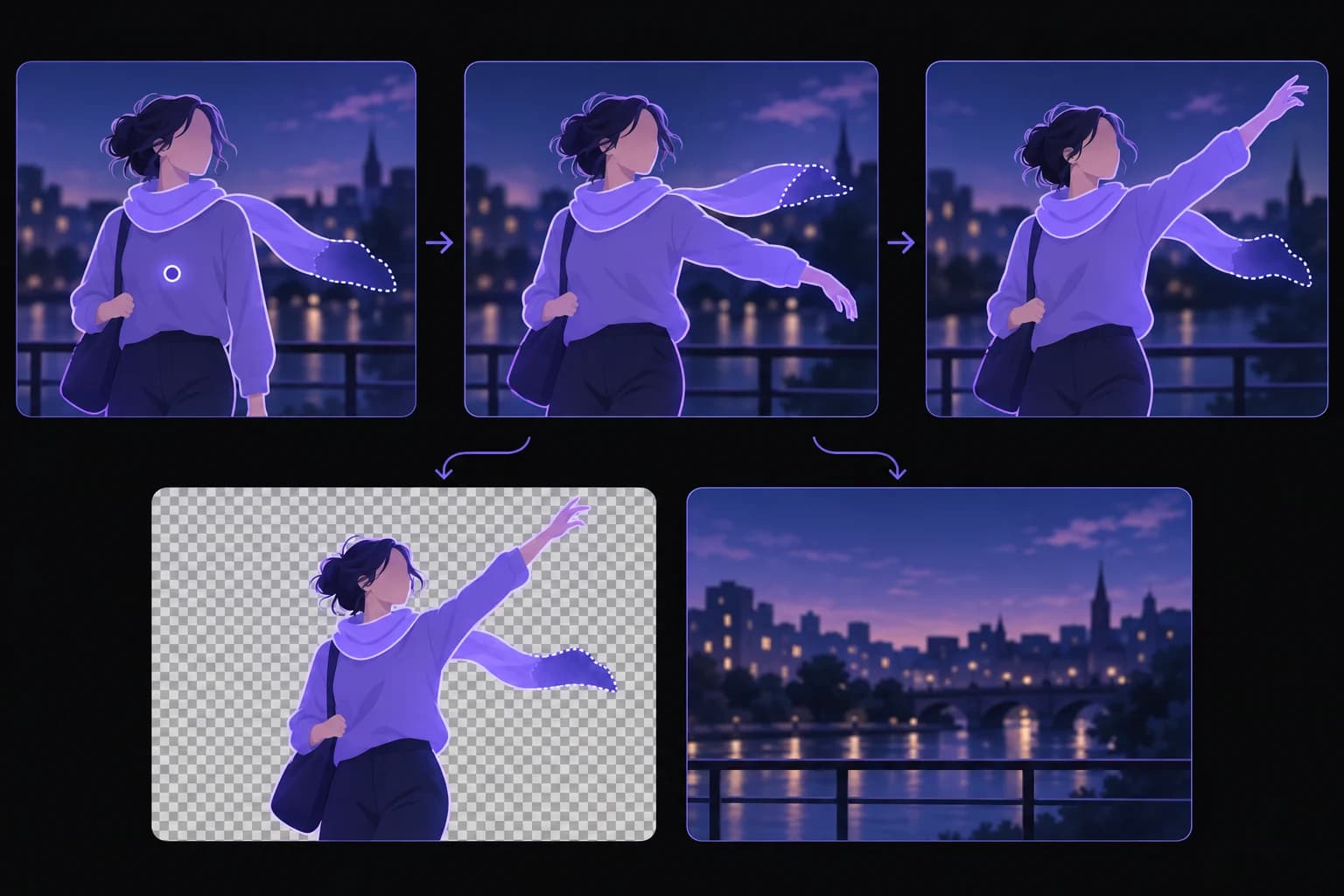
A responsive editing assistant sounds appealing: you point at a video, explain what should remain, and adjust the result without repeatedly starting over. Research into interaction models raises useful questions about that experience. It does not, however, mean that a conversational model has solved hair edges, video encoding, or every other part of background removal.
Thinking Machines Lab introduced a research preview of interaction models on May 11, 2026. The work explores continuous interaction across audio, video, and text. For an editor, the interesting possibility is a better way to communicate intent and correct misunderstandings while working. The background-removal pipeline would still need to perform the actual image and video operations.
This article separates those layers. It explains what the research describes, what a future editing interface might usefully do, and how to evaluate claims about real-time performance. The scenarios below are design possibilities and practical evaluation questions, not a BGRemover.video roadmap announcement or evidence of an existing integration.
What are interaction models in the cited research?
The cited interaction models are trained to handle ongoing human-AI interaction rather than waiting for a simple sequence of isolated conversational turns. Thinking Machines describes a multistream, micro-turn approach intended to support responsive collaboration across modalities.
Its research announcement discusses capabilities such as interruption, simultaneous speech, and awareness of elapsed time. Those capabilities concern the interaction between a person and a system. They should not be translated directly into claims about the speed or quality of a separate video-processing operation.
For example, an assistant might understand that you are correcting an earlier instruction rather than starting a new task. That could be valuable in an editor, where people often refine an idea after seeing a preview. It still needs a connection to the relevant controls and a reliable way to show what changed.
The distinction is familiar outside AI. A video editor can respond instantly when you click a button while taking longer to render the result. A responsive interface helps you stay oriented, but it does not remove the computational work behind the edit.
Treat the research as a reason to ask better interface questions. Can you clarify the intended subject? Can you interrupt an incorrect operation? Can you tell whether the system is still working? Those are useful goals even before deciding which model or architecture might support them.
Why is background editing more than understanding an instruction?
Background editing requires the system to turn an instruction into a selection, maintain it through the video, create the intended composition, and deliver a usable file. Understanding the words is only the beginning of that chain.
A request such as keep the presenter sounds simple until a microphone, chair, or product enters the frame. Should each of those remain? Does the presenter include a hand holding an object? If two people overlap, which one is the target? These are questions of intent that a conversational interface might help clarify.
After intent is clear, the image-processing work remains. The system must preserve the relevant boundaries through movement and handle ambiguous detail. A correct sentence about keeping a scarf is not evidence that the pixels of a sheer scarf have been separated convincingly from the original scene.
The final composition introduces another layer. A replacement background must fit the framing, and the export must preserve timing, audio, and the required format. An interface can be fluent while the resulting file is wrong.
Our SAM video segmentation guide explains the mask stage separately. Keeping these stages visible in the discussion makes it easier to identify what a demonstration actually proves. Did it interpret the instruction, update the selection, render the video, or complete all of those tasks with an accepted result?
What would a useful interactive correction look like?
A useful correction would identify the user's intended change, show the affected region, and let the user verify that the result improves without damaging other content. The interaction should reduce ambiguity rather than merely make the process sound conversational.
Consider a hypothetical presenter clip where the initial cutout excludes a handheld microphone. A useful interface might let the editor indicate the microphone and ask to retain it. Before processing a long sequence, the preview should show whether the selection includes the cable, the hand, and any nearby background by mistake.
The next question is scope. Does the correction apply to one frame, the current shot, or every occurrence of the object? The user needs a clear answer. An apparently helpful instruction can create confusion if it silently changes more of the project than intended.
Keep the result inspectable
A good correction loop needs source/result comparison, an obvious way to undo, and a way to identify the current accepted version. These controls are useful whether the input is a spoken instruction, a click, or a brush stroke. Conversation should complement them rather than hide them.
The scenario is an interface proposal, not a claim that the cited research already performs microphone-aware video masking. To evaluate such a feature, use difficult footage and a sequence of corrections. The question is whether the user reaches a better final asset with less confusion, not whether the assistant can describe the edit fluently.
What does real time actually mean in this context?
Real time needs a defined operation, quality level, and measurement. A fast acknowledgment, a quick preview, and full-quality video processing are different claims, even when a product uses the same phrase for all three.
Start by identifying what the user sees. Does the interface immediately show that an instruction was received? Does it update a still frame? Does it play a processed preview continuously? Or does it finish an entire exported clip? Each answer describes a different part of the workflow.
| Timing claim | What it measures | What it does not establish |
|---|---|---|
| Fast acknowledgment | Response to an input | Completion of the edit |
| Fast preview | A visible provisional result | Final quality or export speed |
| Fast segmentation | Subject-mask processing | Audio, composition, or encoding |
| Fast export | Delivery of a finished file | Correctness on difficult footage |
A preview may deliberately trade resolution or detail for responsiveness. That can be a sensible design choice if the user understands it and the final output behaves predictably. It becomes misleading when a lightweight preview is presented as proof of full-resolution throughput.
Record the source duration, dimensions, task, and environment when measuring a workflow. Also record whether upload, queue time, and download are included. Without those details, a processing-time number is difficult to compare or reproduce. For creators, the most practical measure is often time to an accepted result, including review and correction.
Can a faster interface improve a bad mask?
A faster interface can help you identify and correct a bad mask sooner, but responsiveness alone does not make the underlying selection accurate. The benefit depends on whether the available correction actually changes the problem.
If a strand of hair is missing because the source is heavily blurred, a quick conversation cannot restore a reliable boundary from nonexistent detail. If the mask simply chose the wrong object, a clear correction may be enough. These cases need different responses, and a helpful tool should not treat them as identical.
Preview quality matters too. A very small preview can look clean while hiding the defect that will be visible in the final composition. Let the editor inspect the region at a useful scale and compare it against the intended background. Otherwise, fast feedback can become fast approval of an insufficient result.
Video adds time-dependent problems. Meta's SAM 2 research overview describes memory and corrective prompting for video segmentation, which are relevant to maintaining a selected object across frames. That is a different research layer from conversational turn handling. Connecting the two would require an actual integration and evaluation.
For your own work, first diagnose the failure: unclear intent, incorrect selection, unstable motion, poor edge appearance, or incompatible export. A precise diagnosis tells you whether to change the instruction, the source, the processing method, or the final handoff. Speed is most useful when it helps you make that decision accurately.
How should a tool handle uncertainty while you edit?
A tool should make uncertainty visible enough that the editor knows when to inspect or clarify, without overwhelming every small decision with a conversation. The right feedback depends on the significance of a possible mistake.
For a decorative background, a minor difference in crop may be easy to notice and reverse. For a product demonstration, losing a thin handle or changing an important label can undermine the message. The interface should help the user focus attention where an error would matter most.
One possible design is to mark frames that need review rather than repeatedly interrupting playback. Another is to ask a short question when the intended subject is genuinely ambiguous. These are design options, not features established by the research announcement. Their value would need to be tested with actual editors and footage.
Avoid presenting confidence as a substitute for evidence. A system can sound certain about an edit that still contains visible errors. A side-by-side result, a highlighted region, or an exported test clip gives the user something concrete to judge.
Keep ownership of the decision clear. The user should understand what has been changed, what is still processing, and which version will be exported. This matters particularly when an assistant can continue working while receiving new instructions. Responsiveness is helpful only if the project state remains understandable throughout the interaction.
What should a team test before adopting an interactive editor?
Test the complete workflow with representative footage, realistic revisions, and the actual delivery format. An easy demonstration of one successful command does not establish that the system will handle ordinary production work reliably.
Include a straightforward clip and difficult examples from your own projects. A presenter with a prop, a reflective product, overlapping people, and a fast gesture can reveal different weaknesses. Choose only cases relevant to your work; the aim is a meaningful acceptance set, not an impressive-looking list of challenges.
Ask reviewers to make corrections naturally. Can they explain what is wrong? Does the tool preserve context when they change their mind? Can they stop an operation and recover the previous version? Note where the interaction saves time and where it introduces uncertainty.
Then inspect the exported file. Check the mask during motion, the final background, timing, audio, and compatibility with the next application. Our transparent-video export guide covers the handoff checks that can be missed in a preview-focused demo.
Document failures as well as successes. A workflow that works beautifully on a short talking-head clip may be unsuitable for a dance performance or a product with translucent parts. A narrow, accurate understanding of where the tool helps is more useful than declaring it universally better after a few selected examples.
What can creators do with current background-removal workflows?
Creators can already improve the editing loop by planning a representative test, reviewing the actual result, and making deliberate decisions about source footage and output. You do not need to wait for a conversational interface to apply those habits.
Start by writing down what must remain in the foreground and where the final video will be used. Choose a difficult short section and process it through the same route planned for the full project. Review the movement, edges, and export before committing more time or credits.
BGRemover.video offers a video background-removal workflow with background and export choices. Evaluate those visible capabilities directly. This article does not claim that the product contains Thinking Machines interaction models, a live conversational correction system, or a guaranteed real-time processing mode.
If the result fails, identify the cause before retrying. A different background tone may help a small edge issue; a missing product part may require another take or a more controlled editor. Keep a clear original and name accepted outputs so you can return to them without guessing.
These practices make today's process more predictable and create a fair basis for evaluating future tools. A new interface should improve an already defined task, not replace the need to know what a successful result looks like.
What evidence would justify a stronger future claim?
A stronger claim would need a working integration, representative tests, and clear measurements for the exact editing task. Research about responsive interaction is relevant context, but it does not establish a shipped background-removal feature by itself.
For a creator-facing claim, show the full path from instruction to accepted export. Include difficult movement, a correction, and a compatibility check in the next application. Explain which parts are automatic and where a person intervenes. For a speed claim, state the input, output quality, environment, and whether transfer and queue time are included.
For a product announcement, point to the actual available control or workflow and its current limitations. Avoid turning a possible application into a promised release or describing a prototype as universally production-ready. Readers can appreciate an interesting direction without being told that every remaining problem has already been solved.
Changing a scene can also mean revising its causal action rather than separating a foreground. Our VOID object-interaction deletion guide explains that distinct research task and why it should not be treated as ordinary background removal.
For now, the useful idea is simple: better interaction could make it easier to communicate editing intent and correct mistakes. The quality of the resulting video still needs its own evidence. Try BGRemover.video on a representative clip, inspect the final asset, and judge new editing approaches by whether they make that complete process clearer and more reliable.
Frequently asked questions
Do interaction models remove video backgrounds?
The cited Thinking Machines research concerns real-time human-AI interaction. It does not by itself establish a background-removal pipeline or an integration in BGRemover.video.
Is fast AI conversation the same as fast video processing?
No. Understanding an instruction, updating a preview, processing all frames, and encoding a final file are different operations. Measure them separately when evaluating a workflow.
Could conversation help with a difficult cutout?
It could help communicate intent, such as which person or prop to keep, if an editor connected that instruction to useful controls. That is a possible application, not a feature demonstrated here.
What does real time mean in a video editor?
The term needs a defined task and measurement. A responsive button, a low-resolution preview, and a full-quality processed stream can all have different timing and quality characteristics.
How should I evaluate an interactive editing demo?
Check how quickly it acknowledges an instruction, whether the visible edit is correct, and whether the final exported file matches the preview. Include difficult footage and revisions rather than only one easy example.