Is Your Product Photo Background the Problem? 2026 Guide
Yash Thakker
Author
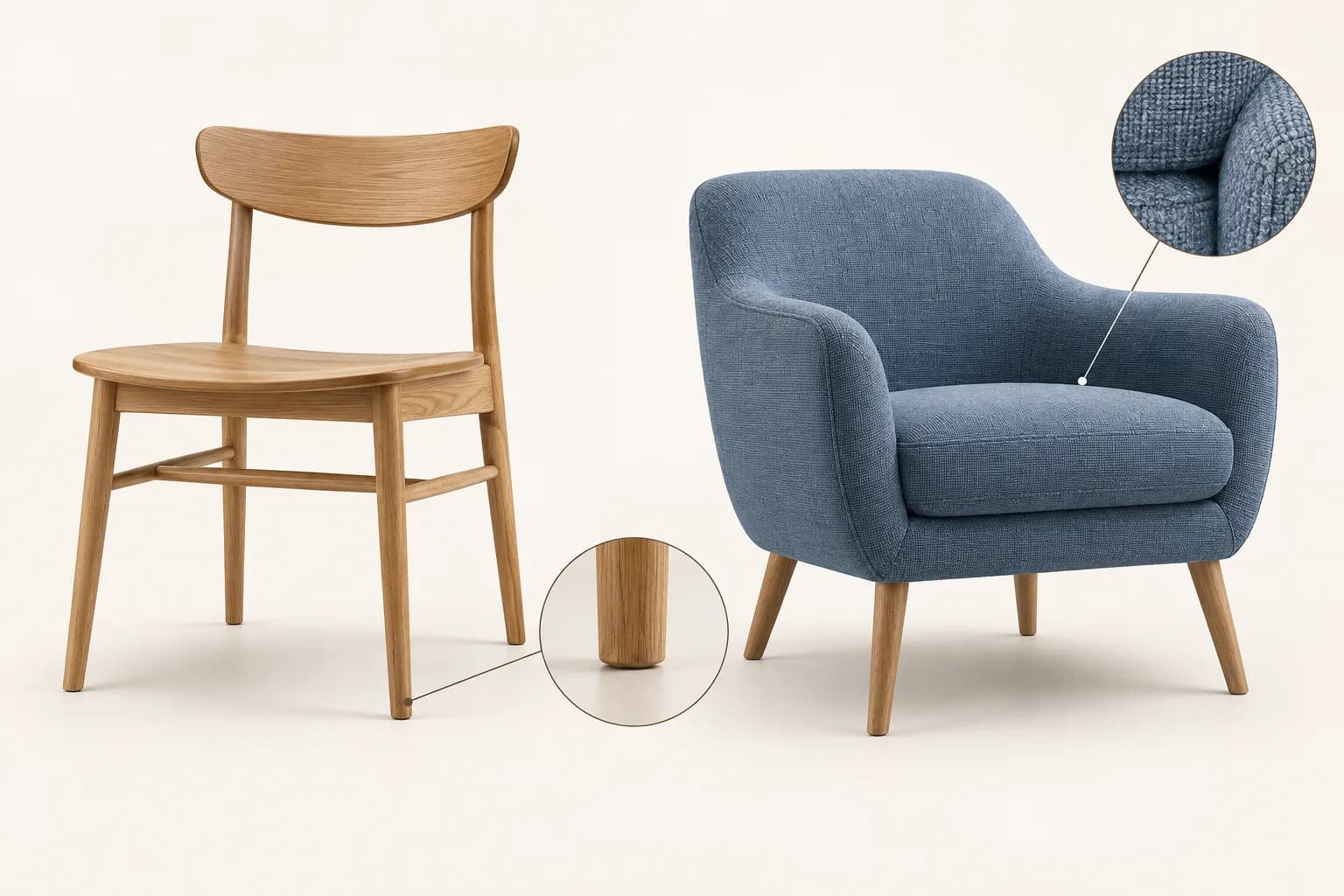
A product photo background is a problem when it makes the item difficult to identify, hides useful detail, creates confusing scale, or distracts from the listing's purpose. It is one possible issue to diagnose, not proof of why a product is not selling. Review the image, the rest of the listing, and the available business evidence before deciding what to change.
The distinction matters because an attractive cutout and a successful offer are different things. Background removal can make an item easier to see. It cannot establish demand, correct a misleading description, change delivery terms, or prove that a price fits the market. A useful photography workflow improves what the image communicates without making claims the evidence cannot support.
The hero illustrates clean presentation and material inspection using furniture. It is not a customer result or a conversion experiment. This guide uses that same practical approach: diagnose visual problems, preserve the real product, choose the right image roles, and evaluate the change honestly.
How can you tell whether the background is distracting?
Look at the image at the size a shopper first encounters it. A full-resolution photo on a large monitor may look clear, while a small listing thumbnail makes the product compete with shelves, patterned fabric, or brightly colored props. Ask whether the item for sale is immediately identifiable without zooming.
Check the contrast between the product and its surroundings. A black cable on a dark tabletop can disappear into the scene. A white object against a bright wall can lose its edge. The answer may be a different backdrop, better lighting, or a more useful angle rather than automatic removal alone.
Look for visual elements that seem to be included in the offer. A decorative tray, extra accessory, or nearby package can confuse what the buyer receives. If props are useful for styling or scale, use them deliberately and make the listing clear. A background that creates ambiguity is doing more than merely looking busy.
Finally, check whether the background draws attention away from the important feature. A patterned cloth behind fine jewelry may compete with its detail. A dramatic room scene can overwhelm a small product. Compare the image with a simpler version while keeping the product scale similar so you can assess the actual visual difference.
What else should you check before blaming the photo?
Review the whole purchase path. A clear image cannot answer a missing size specification, an unclear variant choice, or an unexpected delivery condition. The product may also be reaching the wrong audience. Treat photography as one part of a wider diagnosis rather than the default explanation for weak results.
Start with the questions a buyer would need answered: what is included, how large it is, what it is made from, how it works, and whether it suits the intended use. Some answers belong in photographs, some in video, and some in readable text. The listing should make those sources agree.
Look at customer questions and returns where you have relevant information. Repeated uncertainty about size may call for a scale image or dimensions rather than a whiter background. Confusion about color may require more accurate lighting and variant photography. These are different problems that should lead to different edits.
A useful audit records the issue and the proposed fix separately. Instead of writing improve photos, write that the handle blends into the wall and should be photographed from a clearer angle. Specific observations make it easier to judge whether the change actually solved the visual problem.
Which image roles does a product listing need?
Use different images to answer different questions. A clear identification image shows what the item is. Detail views show texture or construction. A scale image helps the buyer judge size. A lifestyle image shows a plausible use context. Background choices should follow those roles rather than forcing every image into one design.
Etsy's official listing guidance discusses multiple angles, details, lifestyle imagery, and simple backgrounds. The important practical point is that clean presentation and useful context can coexist within a listing. They do not need to be competing approaches.
| Image role | Question it answers | Background consideration |
|---|---|---|
| Main identification view | What exactly is for sale? | Keep the product unambiguous |
| Detail view | What does the surface or mechanism look like? | Avoid competing patterns and reflections |
| Scale reference | How large is it? | Preserve an understandable reference |
| Lifestyle view | How might it be used? | Use a plausible, relevant setting |
| Variant view | Which version am I choosing? | Keep conditions consistent enough to compare |
A clean cutout may be appropriate for the first role and less useful for scale. A chair floating against white does not show whether it fits a compact room. A styled room can help, but it should not distort the product's apparent dimensions. Use a sequence of images to provide both clarity and context.
Should you choose white, a brand color, or a real setting?
Choose according to the destination's rules and the image's role. Marketplace main-image requirements can differ from supplementary images, ads, or a store's own design. Confirm the current requirements for your category and placement before spending time on a background that will be unsuitable.
A neutral background makes comparisons easier when products have different shapes or colors. A brand color can give a campaign a recognizable visual identity, provided it does not distort the item's appearance or violate placement requirements. A real setting can explain use and scale when the context is relevant.
Our Amazon, Etsy, and Shopify background guide separates those platform contexts. Do not transfer a rule for one marketplace's main image to every image on every store. Similarly, a video ad has its own needs and should not be treated as a still catalog photo with motion added.
Test the product against the chosen color. A background can change how viewers perceive the edge and surface even when the product pixels remain unchanged. If a pale item disappears against white, use appropriate lighting, a clearer angle, or a suitable supporting image rather than altering the actual product color to force contrast.
How do you remove a background without changing the product?
Keep the original image and compare the edited result at a useful size. The objective is to remove unwanted surroundings while retaining the actual item. Check shape, color, texture, holes, labels, and included accessories. A tidy outline is not a success if it erases an important product feature.
Pay attention to narrow and ambiguous structures. Jewelry chains, chair legs, cables, mesh, and transparent packaging can be mistaken for background or contain background visible through them. Inspect the gaps as well as the solid surfaces. A filled-in opening can make the product look materially different.
Reflective products need additional care because the surroundings may be visible inside the surface. Removing the external background does not automatically replace every reflection. A shiny object can still carry the color of the original room, and aggressive cleanup can remove the reflections that explain its shape.
For BGRemover.video's image workflow, the current upload code accepts JPG, PNG, and WebP. Test an actual product image and review the current output and account options. Avoid assuming that every product type or batch will need the same amount of review. The furniture catalog workflow explores detailed inspection for larger collections.
Which areas deserve a second look?
Check the parts buyers are likely to inspect closely: connectors, fasteners, seams, edges, stones, labels, and moving components. A background that is gone around the main body can remain inside a handle or between chair slats. Conversely, the software may remove a thin real component because it resembles the surrounding scene.
Review the image on both a light and a dark temporary background before returning to the intended design. This exposes pale halos, dark remnants, and accidental holes. It also helps you decide whether the cutout is suitable for future reuse or only for one particular layout.
How should shadows and scale be handled?
Preserve a believable relationship between the product and its surface. A subtle contact shadow can make an object feel grounded, while a mismatched or overly dramatic shadow can imply the wrong light or shape. Decide whether to preserve, replace, or omit it based on the destination and source.
Do not let automatic cropping change the apparent relative size of products in a comparison. If a small accessory and a large item both fill the same square without explanation, viewers may misread their scale. Consistent framing is useful, but it should not erase meaningful size differences when those differences matter.
For a catalog grid, define a practical framing rule and review it across representative shapes. A tall bottle and a wide tray need different spacing to feel balanced. A single automated fit setting may not create a coherent collection without inspection. Keep the product complete and avoid cropping a useful edge simply to make every tile look identical.
Shopify's product photography guidance discusses consistent preparation and photographing products clearly. Use that as support for a repeatable process, not as evidence that one particular background edit guarantees a business outcome.
What changes when the product is shown in video?
Video adds time and movement to the same accuracy requirements. A product can rotate, reveal a handle, reflect a light, or pass behind a hand. Inspect the entire sequence rather than approving the background removal from one still frame. A detail that disappears for a moment can undermine the demonstration.
Choose a sample containing the hardest action before processing a full clip. Include the rotation, opening mechanism, or hand interaction the buyer needs to see. A stationary opening frame may be much easier to separate than the actual demonstration. If the useful action fails, a simpler background or another editing method may be needed.
The current BGRemover.video video input accepts MP4 and MOV, with background replacement and transparent WebM workflows. Those are separate from still-image delivery choices. Check the downloaded video in the next editor and retain a finished composition suitable for the intended platform.
For marketplace video, read background removal for Amazon product videos. For delicate reflective items, the jewelry video guide provides a more focused context. Match the workflow to the product instead of assuming that one clean portrait sample proves performance on everything.
How can you test whether the new image helps?
Begin with a visual review: is the product easier to identify, are its details accurate, and does the image fit the listing's purpose? Those questions can be answered directly from the asset. Business performance requires a separate comparison with suitable measures and enough context to interpret them.
Define the outcome before looking at results. You may be interested in qualified listing visits, purchase behavior, or fewer questions about the item. Keep track of price, promotion, traffic source, availability, and other changes that could influence the same outcome. Otherwise, a difference after the edit can easily be attributed to the wrong cause.
Where practical, compare image variants under similar conditions and avoid changing many major elements at once. A new background, a lower price, a different audience, and a rewritten title together do not isolate the effect of the background. The combined change may still be useful, but the conclusion should reflect what was actually tested.
Do not turn a small or informal comparison into a universal claim. A clearer product image may be worth keeping even when the available data cannot establish a precise sales effect. Our background-removal and sales guide discusses that measurement distinction in more detail.
What should your final product-image review include?
Review the image in the actual listing layout, including the thumbnail and enlarged view. Check that the selected variant matches the photo, the product is complete, color and material remain credible, and the background does not imply extra included items. Make sure supporting images answer the questions the main image cannot.
Keep the original file, edited master, and publishing export clearly named. For a catalog, record the background, framing, and review choices so future images can follow the same approach. A repeatable process prevents a new collection from gradually drifting into inconsistent crops and lighting.
If the diagnosis is a distracting or unsuitable background, test a representative product image in BGRemover.video and inspect the result carefully. If the diagnosis is missing information, poor source photography, or an unclear offer, address that directly. A useful edit makes the real product easier to assess and keeps any claim about its business impact grounded in evidence.
Frequently asked questions
Can a distracting background hurt a product photo?
It can make the item harder to identify or inspect, especially in a small thumbnail. Whether it affects sales in a particular listing requires evidence beyond the appearance of the photo.
Is the background always the reason a product does not sell?
No. Price, demand, delivery, product details, trust, traffic quality, and other factors can matter. Treat the background as one diagnosable part of the listing rather than a guaranteed explanation.
Should every product photo have a white background?
No. Requirements depend on the marketplace and image role. A clean catalog image, a lifestyle scene, a scale reference, and a detail view can each serve a different purpose.
What should I preserve when removing a product background?
Preserve the actual shape, color, texture, openings, accessories, and details a buyer needs to assess. Review reflective, transparent, thin, and soft-edged areas carefully.
How can I tell whether a new background improved the listing?
Check visual clarity first, then compare suitable business measures under reasonably similar conditions. Record other changes so you do not attribute every difference to the background edit.